
Auth flows
AgentMux supports nineteen providers: claude, codex, muxcode, gemini, qwen, kimi, openclaw, pi, copilot, antigravity, kilo, cline, opencode, goose, grok, dsh, aider, crush and muse. Each provider’s CLI does its own sign-in and keeps its own credentials. AgentMux doesn’t implement those logins: it runs the CLI’s own login command and points the CLI at a config directory AgentMux manages, through the environment variable that CLI already supports (for example CLAUDE_CONFIG_DIR or CODEX_HOME).
muxcode (“Mux Code”) is AgentMux’s own agentic coding CLI (npm: @agentmuxai/muxcode). It emits Claude-compatible stream-JSON, so AgentMux reuses the Claude translator for it.
The per-provider values come from frontend/app/view/agent/providers/catalog.ts (PROVIDERS: authType, authCheckCommand, authLoginCommand, authConfigDirEnvVar, authExtraEnv) and crates/srv/src/backend/providers.rs.
Per-provider summary
Section titled “Per-provider summary”| Provider | authType | Login command AgentMux runs | Config dir env var |
|---|---|---|---|
| Claude Code | oauth | claude auth login | CLAUDE_CONFIG_DIR |
| Codex CLI | oauth | codex login | CODEX_HOME |
| Mux Code | api-key | muxcode auth login | MUXCODE_CONFIG_DIR |
| Gemini CLI | oauth | gemini auth login | GEMINI_CLI_HOME (plus GEMINI_FORCE_FILE_STORAGE=true) |
| Qwen Code | api-key | qwen auth | QWEN_HOME |
| Kimi Code CLI | api-key | kimi login | KIMI_SHARE_DIR |
| OpenClaw | oauth | openclaw models auth login --provider openai-codex | OPENCLAW_HOME |
| GitHub Copilot CLI | oauth | copilot auth login | COPILOT_HOME |
| Pi | cli-managed | pi-acp --terminal-login | PI_CODING_AGENT_DIR |
| Antigravity (AGY) | cli-managed | None: agy signs in the first time it runs | None: agy signs in once per machine |
| Kilo Code CLI | cli-managed | kilo auth login | XDG_DATA_HOME |
| Cline CLI | cli-managed | cline auth | CLINE_DIR |
| OpenCode | cli-managed | opencode auth login | XDG_DATA_HOME |
| goose | cli-managed | goose configure | GOOSE_PATH_ROOT (plus GOOSE_DISABLE_KEYRING=1) |
| Grok Build | cli-managed | grok login | GROK_HOME |
| DeepSeek Harness | cli-managed | dsh web (set the key on its Models page) | DSH_HOME |
| Aider | cli-managed | None: set your model provider’s key in the environment | None: Aider keeps its state in ~/.aider |
| Crush | cli-managed | crush login | CRUSH_GLOBAL_DATA |
| Muse Code | cli-managed | muse login | XDG_CONFIG_HOME |
Kilo Code CLI and OpenCode keep their sign-in under XDG_DATA_HOME, and Muse Code under XDG_CONFIG_HOME. AgentMux sets that variable to the provider’s folder, and the CLI makes its own kilo, opencode or muse folder inside it. Each of these variables was checked against the installed CLI: setting it moves where the CLI keeps its sign-in.
AgentMux checks whether a CLI is signed in by running its own status command (for example claude auth status --json or codex login status). The nine newest harnesses have no status command AgentMux can rely on, so for them there is no check: the launch goes ahead, and a CLI that isn’t signed in says so in the pane when its session starts.
OAuth providers
Section titled “OAuth providers”Five providers use a browser login: Claude Code, Codex CLI, Gemini CLI, OpenClaw and GitHub Copilot CLI. OpenClaw’s login is OpenAI’s “Sign in with ChatGPT” flow, because OpenClaw uses Codex as its backing model. OpenClaw also needs its own Gateway daemon running; openclaw onboard sets that up.
All five are account-backed: an agent using one of them must have an account bound for that provider (see Connectors → Accounts), or AgentMux refuses to start the CLI (provider_class in crates/srv/src/identity/resolver/provider.rs, enforced in inject_identity_env in crates/srv/src/identity/resolver/inject.rs).
AgentMux does not pass an API-key environment variable to these CLIs as a fallback.
API-key providers
Section titled “API-key providers”Three providers are configured with their own CLI’s login or config command and a key: Mux Code, Qwen Code and Kimi Code CLI. Mux Code also counts as signed in when a local model is installed; its auth login pulls a default local model when nothing is configured. Qwen Code talks to an OpenAI-compatible endpoint (for example OpenRouter), set through OPENAI_BASE_URL, OPENAI_API_KEY and OPENAI_MODEL.
CLI-managed providers
Section titled “CLI-managed providers”For Pi, Antigravity and the nine newest harnesses (Kilo Code CLI, Cline CLI, OpenCode, goose, Grok Build, DeepSeek Harness, Aider, Crush and Muse Code), the CLI keeps its own sign-in and AgentMux binds no account. AgentMux points the CLI at its shared folder for the provider, so every agent of that provider uses the same sign-in, kept apart from any copy of the CLI you use outside AgentMux.
- Kilo Code CLI and OpenCode run signed out on their own free models. Sign in to use your own account or keys.
- Cline CLI and Grok Build refuse to start a session until you sign in. Grok Build also takes
XAI_API_KEY. - goose has no sign-in of its own:
goose configurepicks a model provider and key once. Until then its session fails, namingGOOSE_PROVIDER. AgentMux setsGOOSE_DISABLE_KEYRING=1, so goose keeps its keys in a file in its folder instead of the OS keyring, whose prompt could block an agent nobody is watching. - DeepSeek Harness starts signed out but needs a DeepSeek API key for its first prompt. Set it on the Models page of
dsh web, or asDEEPSEEK_API_KEY. - Aider has no login. It reads your model provider’s key from the environment.
- Crush also takes a key set in its own UI, and Muse Code takes
META_API_KEY.
Signing in from an agent pane
Section titled “Signing in from an agent pane”When an agent pane launches, AgentMux runs the CLI’s auth check. If it fails, the pane shows Not signed in with Log in, Login via terminal, and Connectors → Accounts. When an existing account for the provider can be bound instead, the last action becomes Bind: <account> (one candidate) or Bind account (several). After a turn has been rejected for auth, Log in reads Login Again. See First Agent Setup.
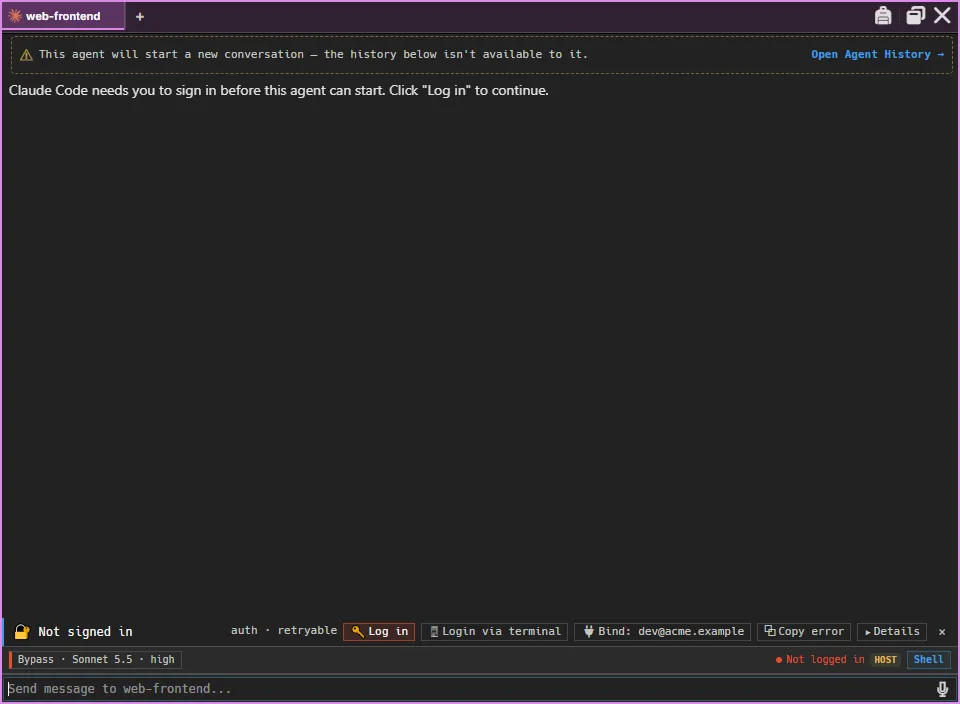
Log in goes through frontend/app/view/agent/flows/run-provider-login.ts (runProviderLogin):
- For the five account-backed providers (Claude Code, Codex CLI, Gemini CLI, GitHub Copilot CLI and OpenClaw), AgentMux first allocates an account directory and points the login there. If the agent already has an account bound for the provider, that account’s directory is reused.
- It runs the login command and waits about 15 seconds for a login link in the CLI’s output. If it finds one, it opens it in your browser and shows the link in the pane with a box for pasting an authorization code, which is passed to the running login command. Claude Code and OpenClaw run the login in a pseudo-terminal. AgentMux then waits up to 5 minutes for the login to finish.
- If the CLI prints no link, AgentMux opens a terminal window for the login. For the account-backed providers it waits up to 5 minutes for the CLI’s auth check to succeed in the account directory. For the other providers it can’t detect completion: finish the login in the terminal, then log in again from the pane.
- On success, the account is saved and linked to the agent.
Login via terminal skips step 2 and goes straight to the terminal window.
For every other provider, no account is created: the login writes to the ambient directory described next. The newer CLI-managed harnesses log in interactively, so their login always runs in a terminal window.
Where credentials are stored
Section titled “Where credentials are stored”There are two places.
Ambient directory. AgentMux points every agent’s CLI at the provider’s shared directory unless a bound account overrides it (crates/srv/src/server/app_api/agent_open.rs):
~/.agentmux/shared/providers/claude/~/.agentmux/shared/providers/codex/~/.agentmux/shared/providers/gemini/…This is DataPaths::provider_auth_dir in crates/common/src/data_paths.rs. The subdirectory name is the provider’s authDirName, which is the provider id (claude, codex, muxcode, gemini, qwen, kimi, openclaw, copilot, pi, antigravity, kilo, cline, opencode, goose, grok, dsh, aider, crush, muse). It is account-wide: every channel, version and instance on the machine shares it.
On Linux and macOS, AgentMux keeps its data root ~/.agentmux, which holds both kinds of credential directory, readable only by your user account. It creates the folder with mode 0700, and on startup it removes group and other access from an existing one (ensure_owner_only_dir in crates/common/src/data_paths.rs). On Windows your user profile’s permissions already restrict it to you.
Every provider except the five account-backed ones runs on the ambient directory, apart from Antigravity and Aider, which read no config-dir variable. The five account-backed providers need a bound account; choosing (ambient credentials) in the create dialog for one of them leaves the agent unable to start until you sign in or bind an account.
Account directories. An OAuth login made through AgentMux for Claude Code, Codex CLI, Gemini CLI, GitHub Copilot CLI or OpenClaw is saved as an account with its own directory, <identities>/<account_id>/<provider>/, where <provider> is the authDirName. When an agent is bound to such an account, AgentMux points the CLI’s config-dir variable there instead of at the ambient directory. Where <identities> lives depends on the channel, as described next.
Isolated auth by channel
Section titled “Isolated auth by channel”Accounts are isolated per channel by default, except on stable (crates/common/src/data_paths.rs, isolated_auth_enabled and identities_dir):
stable(every release build) shares one account list and one account-directory tree,~/.agentmux/shared/identities/.- Any other channel, such as a
dev-<branch>build fromtask devor a localtask packagebuild’slocal-<branch>-<hash>-<build-id>channel, gets its own account list and keeps account directories under that channel’s own directory (<channel dir>/identities/). A fresh non-stablechannel starts with no accounts. - The ambient directory is never isolated. It stays account-wide on every channel.
- Override:
AGENTMUX_ISOLATED_AUTH=1forces isolation, even onstable. Setting the variable to any other value turns isolation off, even on a non-stablechannel.
This exists so that dev and local builds exercise real login code paths instead of silently inheriting a signed-in global session. See Identity & Accounts for how an agent’s link to an account survives a channel switch, and Multi-instance & dev mode for channels in general.
History
Section titled “History”Earlier builds kept provider credentials per instance, so switching channels or versions meant signing in again. agentmux#1291 (June 2026) moved them to the account-wide shared/providers/ directory.
Connectors: Accounts
Section titled “Connectors: Accounts”The Accounts section of Connectors (Connectors → Accounts) manages accounts. It shows a tile per service: AgentMux, GitHub, Google, AWS, OpenAI, Anthropic, Slack and Custom (frontend/app/view/accounts/accounts-catalog.ts, SERVICE_CATALOG). Clicking AgentMux opens its own sign-in panel for AgentMux Cloud. If that sign-in stops working (its refresh was refused, or the cloud moved to a new sign-in service), the panel and the host popover in the status bar show your email with a Sign in again button, and AgentMux stops reconnecting with the old sign-in until you do (frontend/app/view/accounts/AgentMuxConnectPanel.tsx, frontend/app/statusbar/HostPopover.tsx). Clicking any other tile offers Connect with OAuth, Add API key / token, or both:
- Anthropic → Connect with OAuth runs the Claude Code login inside AgentMux.
- GitHub OAuth uses GitHub’s device flow; Google and Slack use a PKCE browser login. None of the three ships a built-in OAuth client: you create your own OAuth app and paste its client ID (and, for Slack, its client secret) (
frontend/app/view/accounts/oauth-catalog.ts). - AWS, OpenAI and Custom offer only Add API key / token.
- Add API key / token opens the Add Account form. Keys are stored in your OS keychain by default. Validate & Save checks the key against the service first; this is available for GitHub, OpenAI and Anthropic keys. Save without validating skips the check.
The Add Account form:
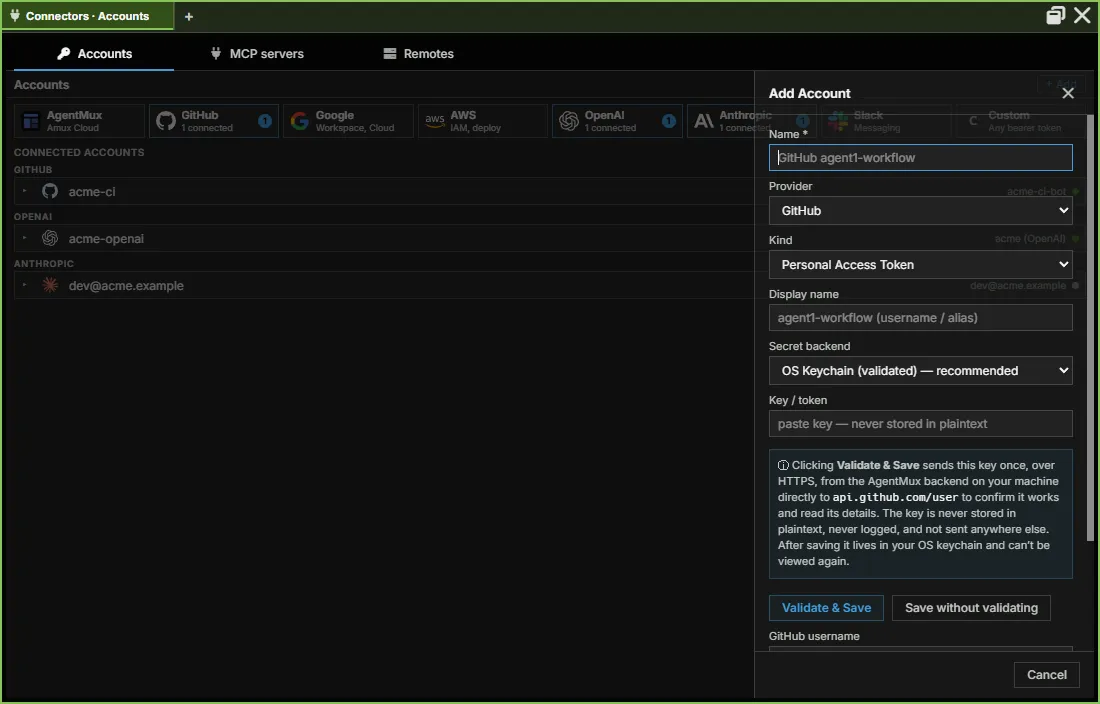
Each account shows a status dot: green (valid), red (expired or invalid), amber (checking) or grey (unknown). For Claude Code, Codex CLI and OpenClaw accounts, the status is refreshed from the account’s credential file each time AgentMux starts a bound agent’s CLI.
To bind an account to an agent, right-click it and choose Bind to Agent, or use the Accounts tab of the agent’s Stash. When an agent bound to one of these accounts starts, AgentMux sets that account’s key in the agent’s environment:
| Account | Environment variables |
|---|---|
| GitHub | GITHUB_TOKEN, GH_TOKEN |
| Anthropic | ANTHROPIC_API_KEY |
| OpenAI | OPENAI_API_KEY |
| Kimi | MOONSHOT_API_KEY |
| AWS | AWS_ACCESS_KEY_ID |
These mappings are in crates/srv/src/identity/resolver/provider.rs (provider_class). Keys for other services are not put in the environment. The Add Account form has no Kimi option.
Accounts vs the ambient directory
Section titled “Accounts vs the ambient directory”These are independent layers:
- The ambient directories are account-wide, provider-scoped and always global. Every instance on the machine shares them.
- Accounts are bound per agent: a new agent takes the provider’s first account, and you change it later with Bind. They override the ambient directory for that agent, and the five account-backed providers require one. Unlike the ambient directories, they follow the Isolated auth by channel default.
Two agents in the same instance can use different accounts for the same provider.
Pre-launch OAuth panel
Section titled “Pre-launch OAuth panel”The agent launch dialog contains a sign-in panel, Connect to <provider>, which creates an account and selects it. Nothing in the current agent picker opens that dialog: creating an agent from a template uses the panel under its card in the agent picker, which has no sign-in step, and relaunching an agent from My Agents launches it directly. Sign-in happens in the agent pane instead, as described in Signing in from an agent pane.
Manual login
Section titled “Manual login”For a provider that runs on the ambient directory, you can sign its CLI in yourself, outside AgentMux, by setting its config-dir variable first:
export KIMI_SHARE_DIR=~/.agentmux/shared/providers/kimikimi loginAgents using that provider without a bound account then pick up the login. This doesn’t work for the five account-backed providers: a login in the ambient directory doesn’t satisfy their account requirement, so use Log in in the agent pane or Connectors → Accounts. This is rarely needed; Log in in the agent pane covers the usual case.
See also
Section titled “See also”- First Agent Setup: provider install and sign-in
- Identity & Accounts: per-agent account binding
- Multi-instance & dev mode: instance and channel layout
- Settings reference: settings and environment variables