
LAN discovery
AgentMux instances can discover each other on the local network using mDNS / DNS-SD, the zero-configuration protocol behind Bonjour and printer discovery. With it on, every AgentMux on your LAN appears in the Warden widget’s LAN section and in the host popover, with its hostname and version, and agents can send messages directly to agents on those machines.
LAN discovery is off by default and can be switched on and off live from the status bar.
What turning it on does
Section titled “What turning it on does”While LAN discovery is on, your instance:
- opens its API to the network. The AgentMux server binds its two ports on every non-loopback address of the machine (IPv4, and IPv6 except link-local), in addition to loopback. These listeners serve the full server API, protected by the instance’s keys;
- advertises itself as mDNS service
_agentmux._tcp.local.. The record carries the hostname, the AgentMux version, an instance id (vplus the version), the server’s port and IP addresses, and the instance’slan_key; - answers discovery probes on UDP port 47891 from private and link-local addresses, replying with the same details and the same
lan_key; - browses for peers and keeps the peer list up to date in the Warden and the host popover;
- asks every peer for its agent names every 30 seconds, so you can see which agents live where;
- checks that an agent isn’t already running on another computer: before an agent starts, and every 30 seconds while it runs, it asks each peer whether it is running that agent. If one is, the agent isn’t started here, or, if both are running it, the later start is stopped. See one live instance per agent;
- forwards messages: a
SendMessageto an agent that isn’t on this machine is tried on the LAN peers before MuxBus Cloud.
What it does not do: enforce any policy on peers, or share workspace state between instances.
What the lan_key allows
Section titled “What the lan_key allows”The lan_key is sent in cleartext, so treat it as known to every device on the network. It is a separate key from the instance’s full auth key and opens only four routes. With it, anyone on the LAN can:
- send a message into any of your agents’ conversations. The message is marked
DELIVERY=lanand, unless it carries a valid signature,TRUST=network-claimed; it is not flagged sensitive unless its content triggers that; - list your agents’ names, with each agent’s one-line summary of what it’s working on unless you turn that off (see Swarm summary lines), and look up one agent’s registration details and public signing key;
- ask whether a given agent is running on this machine, and since when.
Answers from peers aren’t authenticated either: a device that pretends to be a peer and claims to be running one of your agents can keep that agent from starting here, or stop it.
It can’t reach anything else in the API. The lan_key is regenerated each time AgentMux starts. See Network exposure and Reactive event bus for the details.
Enable it
Section titled “Enable it”Click the hostname in the status bar to open the host popover, and flip the LAN discovery toggle. The popover then shows the number of peers found and each peer’s hostname and version, or Searching for peers….
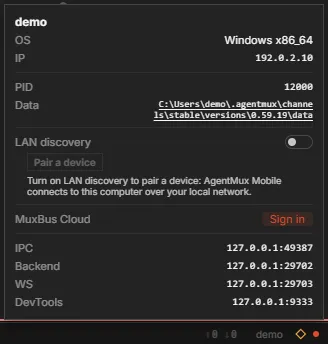
The toggle writes "network:lan_discovery": true to settings.json and starts discovery and the LAN listeners immediately, with no restart. Turning it off stops advertising, closes the LAN listeners and clears the peer list.
You can also set "network:lan_discovery": true in settings.json by hand (~/.agentmux/channels/settings.json on the stable channel). A hand edit takes effect at the next start of AgentMux; only the toggle applies immediately.
Pairing the mobile app
Section titled “Pairing the mobile app”With LAN discovery on, the host popover offers Show QR code, for pairing the AgentMux mobile app. The QR code contains this machine’s LAN address, the server port, and the instance’s full auth key, not the lan_key. Anyone who scans or photographs it can control this AgentMux instance over the network, with the same power as the app itself, until AgentMux restarts. Show it only to the device you are pairing.
What a paired device can see
Section titled “What a paired device can see”A device paired with this computer (the AgentMux mobile app) watches it, read-only. Settings ▸ Paired devices lists the paired devices, and you can revoke each one there.
- Its panes. The device can list every pane on this computer, window by window and tab by tab: agents, by the name their live feed opens by; terminals, including each agent’s shell, and whether they are running; and every other pane by name.
- Agents’ live feeds. A feed keeps following an agent after it restarts in another pane, and shows lines that another pane or another AgentMux instance adds to the agent’s conversation.
- Terminals, only if you allow it. Turn on Share terminals with paired devices (
viewer:shareterminals) and a paired device can watch this computer’s terminals, read-only and live. It’s off by default, because terminals often show passwords and keys. Turning it off closes any terminal a device is watching.
An agent you hide from paired devices (the Devices tab of its Stash, Hide from paired devices) is left out of the list and can’t be watched. Its shell stays hidden too, even with terminal sharing on.
Publish this computer to my devices
Section titled “Publish this computer to my devices”While you are signed in to MuxBus Cloud, this computer tells the cloud it is online, so your signed-in devices can list it from anywhere, not only on your network. The setting is Settings ▸ Paired devices ▸ Publish this computer to my devices (cloud:publishpresence), on by default.
Your devices see this computer go offline at once when you quit AgentMux, sign out of MuxBus Cloud or turn the setting off. Dev builds, headless installs and isolated homes never publish, whatever the setting says, and Settings says why.
Swarm summary lines
Section titled “Swarm summary lines”The Swarm shows agents running in this computer’s other AgentMux instances (other channels) and on LAN peers, each with its status. By default it also shows each agent’s one-line summary of what it is working on. Your signed-in devices see the same lines, over the cloud and on the local network.
The summaries go out through the same route as your agents’ names, so anyone on your network who has the lan_key can read them. To share status only, turn off Settings ▸ Paired devices ▸ Share what my agents are working on (swarm:sharesummaries).
Windows Firewall
Section titled “Windows Firewall”The first time you turn LAN discovery on, Windows Firewall asks whether to allow AgentMux on the network, because it opens network-facing sockets.
- Allow it on Private networks, and make sure your home or office network is classed as Private in Windows.
- Don’t allow it on Public networks unless you want the LAN listeners reachable from coffee-shop and conference Wi-Fi.
If you block it, peers can’t reach your instance. The host popover shows the error in the LAN section if discovery fails to start. To change your answer later: turn the toggle off, edit the rule in Windows Defender Firewall (Allow an app through firewall), then turn the toggle back on.
Why it’s off by default
Section titled “Why it’s off by default”Turning it on exposes the server to the network, broadcasts a key that lets anyone on the LAN message your agents, and triggers a firewall prompt on Windows. Leaving it off means a fresh install never does any of that. See Network exposure for the full picture.
Privacy considerations
Section titled “Privacy considerations”While it’s on, anyone on your broadcast domain learns:
- your machine’s hostname and IP addresses;
- the AgentMux version and the server’s port;
- the
lan_key, and through it the names of your agents, which of them are running, and, unless you turn offswarm:sharesummaries, each agent’s one-line summary.
The broadcast carries no conversation content, files, or credentials other than the lan_key.
mDNS and the UDP probe replies stay on your local network, but the LAN listeners bind every non-loopback address, including globally routable IPv6 addresses and VPN adapters. On a network you don’t trust (public Wi-Fi, a conference network, a shared office VLAN), leave LAN discovery off.
Multiple instances on the same machine
Section titled “Multiple instances on the same machine”Two instances on the same machine that both have LAN discovery on see each other as LAN peers: they share addresses but not ports. They don’t need it to message each other, though. Instances on the same machine reach each other’s agents through a local registry, whether or not LAN discovery is on. See Running multiple instances.
Same-network setup
Section titled “Same-network setup”For peers to appear, you need:
- LAN discovery on on both instances.
- The same subnet or broadcast domain. Most home and office networks satisfy this.
- mDNS not blocked by the network. Some corporate networks and many VPNs filter UDP 5353. The UDP probe on port 47891 is a fallback used by the mobile app.
- Each peer’s firewall allowing the connection.
If a peer is missing, the usual causes are a firewall (yours or the peer’s), VPN or VLAN isolation, or LAN discovery being off on one side.
See also
Section titled “See also”- Network exposure: every listener and what it accepts
- Warden widget: the operator surface that shows LAN peers
- Running multiple instances: multiple AgentMux processes side by side
- LAN discovery (internals): the mDNS module, listeners and live toggle