
Getting Started with AgentMux
AgentMux is an agent operating environment: a desktop app where AI agents are first-class residents, in structured panes with their own identity and memory, and with the ability to operate the workspace itself. It’s built in Rust, with a bundled Chromium runtime (CEF) and a SolidJS frontend.
What is AgentMux?
Section titled “What is AgentMux?”In AgentMux, an agent is not a terminal wrapper. Each one runs in a structured pane with its own identity, optional bundle, streaming parser and lifecycle. AgentMux supports nineteen harnesses (the CLI tools that run agents): Claude Code, Codex CLI, Mux Code, Gemini CLI, Qwen Code, Kimi Code CLI, OpenClaw, Pi, GitHub Copilot CLI, Antigravity (AGY), Kilo Code CLI, Cline CLI, OpenCode, goose, Grok Build, DeepSeek Harness, Aider, Crush and Muse Code. The agent picker has a template for seventeen of them; Mux Code and Qwen Code don’t have one yet. You see each tool call and file edit as it happens, except with Aider, Crush and Muse Code, which run in their own UI in a terminal pane.
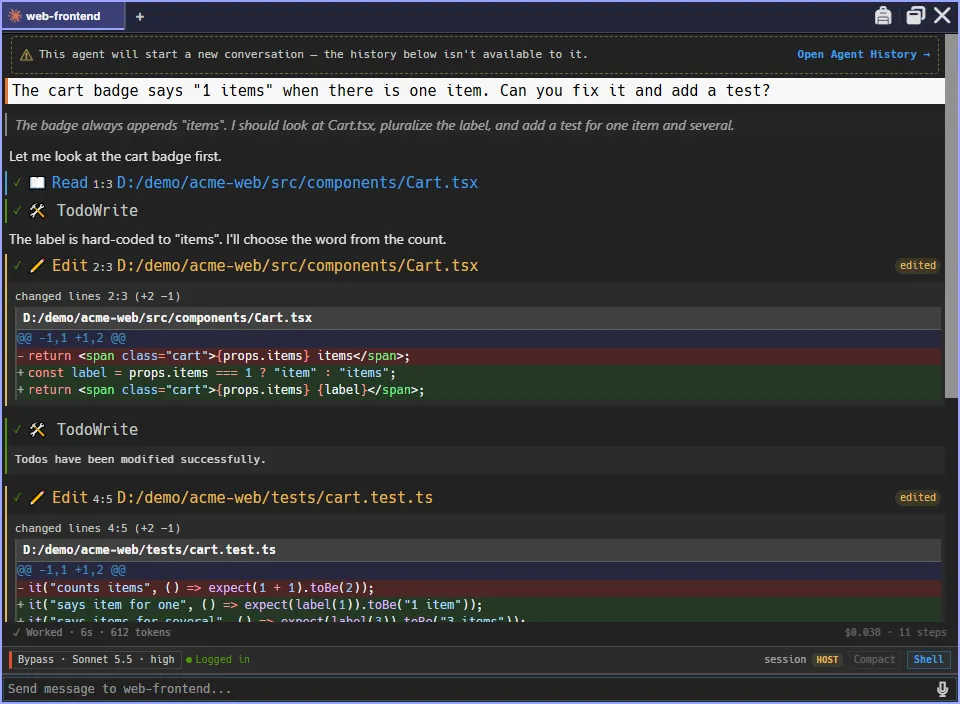
Agents can also operate the environment itself through AgentMux’s own tools: opening panes, renaming tabs, messaging other agents and moving around the workspace.
Key Concepts
Section titled “Key Concepts”- Panes: the units of the workspace. The widget bar opens them: Agent, Swarm, Memory, Hangar, Connectors, Terminal, Editor, Browser, Messengers, Sysinfo and Help, and under more, Drone, Warden, Media, Toolchain, Tower and Settings. See Pane Types.
- Self-contained CLIs: AgentMux installs each npm-based agent CLI itself, at the version it was tested with, the first time you pick it. You don’t run
npm install -gfirst, but you do need Node.js and npm, which AgentMux can install for you. Six harnesses aren’t on npm: Kimi Code CLI, Antigravity, goose, Grok Build, Aider and Muse Code. Install those with the vendor’s own installer; AgentMux shows the command and finds the CLI afterwards. See First Agent Setup. - Accounts: provider logins and API keys, managed in Connectors → Accounts. A new agent takes the provider’s first account; you change it later with Bind. Claude Code, Codex CLI, Gemini CLI, OpenClaw and GitHub Copilot CLI agents need a bound account; the other providers can run on AgentMux’s shared login folder for the provider instead. See Auth flows.
- Bundles: reusable sets of instructions, MCP servers, memory and skills, tied to one provider. Manage them in Memory → Bundles. An agent takes several, in order, picked in its Bundles field.
- Harness vs. model vendor: the harness is the CLI driving a session (Claude Code, Codex CLI, Antigravity, …); the model vendor is the LLM backend serving its responses. A harness talks to its default vendor unless you redirect it; today only Claude Code can be pointed at a custom endpoint. See First Agent Setup.
- Interagent Comms: agents message each other over the MuxBus (host, LAN and WAN tiers). They use
DiscoverAgentsto find peers andSendMessageto send them messages. See Interagent Comms. - MuxAPI: AgentMux’s MCP server and local API let agents control the workspace: open panes and tabs, rename tabs and windows, switch tabs, and find and message other agents. This is what makes AgentMux an operating environment. See MuxAPI.
- Swarm: a live tree of your agent panes, with their subagents, todos and running tools.
- Toolchain: ≡ → Toolchain shows your
PATHand the version, path and status of Node.js, npm, Git, Python and every agent CLI, with install links and a one-click install for Git, Node.js, npm and Python. - Reducer stack: how state moves between AgentMux’s processes. See The reducer stack.
Quick Install
Section titled “Quick Install”Windows (x64): install from the Microsoft Store, or download the installer (.exe) or portable build (.7z) from GitHub Releases.
macOS (Apple Silicon): download the .dmg from GitHub Releases.
Linux (x86_64): download the AppImage, .deb, .rpm or .tar.gz from GitHub Releases. For the AppImage:
chmod +x AgentMux_*_amd64.AppImage./AgentMux_*_amd64.AppImageNext Steps
Section titled “Next Steps”- Installation: platform-specific install details
- Quickstart: your first agent in a few minutes
- First Agent Setup: connect your first AI agent
- Configuration: customize AgentMux settings
- Keybindings: keyboard shortcuts reference