
Warden widget
The Warden is a pane for supervising agents. It shows which agents are registered to receive messages on this AgentMux instance, which AgentMux instances are on your local network, and a feed of recent message deliveries and Supervisor decisions. It has two control actions: soft-deregistering an agent on this instance, and choosing which agents a supervising agent may nudge to continue when they stall.
Where to find it
Section titled “Where to find it”The Warden widget (icon: shield-halved) is not pinned to the widget bar by default (crates/srv/src/config/widgets.json, defwidget@warden). Open it in any of these ways:
- Click more at the end of the widget bar and choose Warden. Right-click it there and choose Pin to bar to keep it in the bar.
- Right-click a pane header → Replace With… → Warden.
- Press
Ctrl+Shift+Kto turn the focused pane into the widget launcher, then choose Warden.
There is no keyboard shortcut or command-palette entry for the Warden itself.
The five sections
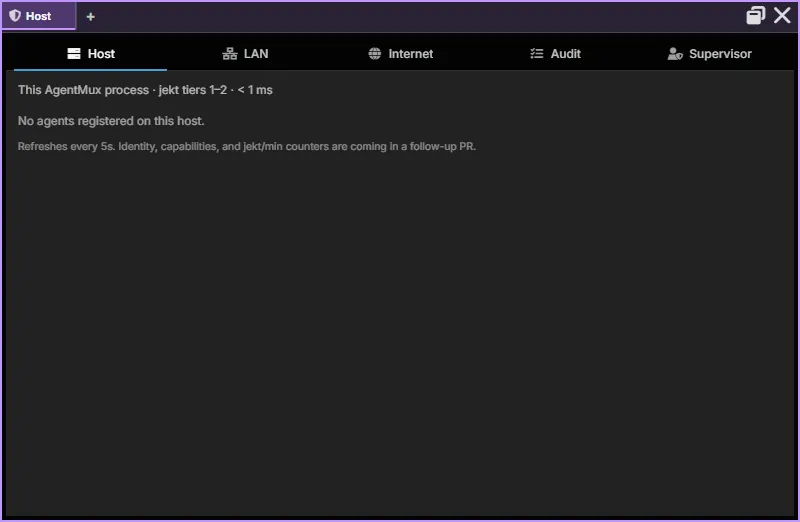
Section titled “The five sections”The Warden is a pane view with its sections as tabs along the top, the same layout the Connectors and Memory panes use (frontend/app/view/warden/warden-view.tsx). In a narrow pane the tabs show only their icons; in a wide one they stop growing and sit at the left. The selected section is saved with the pane.
| Section | Icon | What it covers |
|---|---|---|
| Host | server | Agents registered with this instance’s message handler, plus soft deregister |
| LAN | network-wired | Other AgentMux instances found on the local network (read-only) |
| Internet | globe | Placeholder; no functionality yet |
| Audit | list-check | Recent jekt deliveries, Supervisor decisions and fleet actions |
| Supervisor | user-shield | Per-agent auto-continue opt-in, and recent Supervisor decisions |
All five sections stay mounted while the Warden is showing, so switching between them is instant. Host, LAN, Audit and Supervisor each refresh every 5 seconds, including the sections you aren’t looking at; Internet is static. If the Warden is a background tab in a pane with several tabs, it is unmounted and stops refreshing until you switch back to it. The pane title shows the selected section’s name, and Ctrl+scroll zooms the Warden.
Host section
Section titled “Host section”The Host section lists every agent currently registered with this instance’s message handler, the component that delivers jekts (frontend/app/view/warden-host/warden-host-manager.tsx).
| Column | What |
|---|---|
agent | Agent ID |
block | First 8 characters of the pane’s block ID |
last seen | Time since the agent last registered |
state | active if it registered less than 30 seconds ago, otherwise idle |
An agent registers when its pane’s agent process starts, and again each time you send it a message from its pane (crates/srv/src/server/agent_handlers/input.rs). A turn started by a jekt doesn’t re-register it, and there is no periodic heartbeat. So last seen counts from the process start or your last message, and state changes to idle about 30 seconds later even if the agent is still busy. It does not tell you whether the agent is working; use Swarm for that.
An agent’s row disappears when it is unregistered: its pane closes, its process exits, its agent ID changes, or you deregister it here. An agent that is already live in another AgentMux instance, on this machine or elsewhere, is refused registration, so its pane never appears here (crates/srv/src/backend/agent_admission.rs).
Soft deregister
Section titled “Soft deregister”Each row has a × button (“Deregister (soft kill — removes from jekt routing, leaves process running)”). After you confirm, AgentMux removes the agent’s routing entry on this instance and its entries in the registries other AgentMux instances on this machine read, stops its MuxBus cloud subscription, and drops its Swarm subagent tracking (crates/srv/src/server/reactive.rs).
- The agent’s process and pane keep running. Its conversation and data are untouched.
- Jekts are no longer delivered to that pane, whether sent from this machine, the LAN or the cloud relay. If the agent has a saved definition, a jekt sent to it can be held for up to 24 hours and delivered when the agent registers again.
- The agent registers again when its agent process restarts or when you next send it a message from its pane. (The confirmation dialog says it “may re-register on its next heartbeat”; there is no heartbeat, these two events are what re-register it.)
Use this to stop an agent receiving messages while you investigate, without killing it. To stop agent processes, use the Swarm fleet toolbar.
LAN section
Section titled “LAN section”The LAN section lists other AgentMux instances on your network. It fills in once LAN discovery is on: open the host popover in the status bar and tick LAN discovery (setting network:lan_discovery, off by default). Each instance must have it on. See LAN discovery.
| Column | What |
|---|---|
peer | The peer’s hostname, or its instance ID |
version | The peer’s AgentMux version |
address | The peer’s IP address and port |
agents | Number of agents registered on the peer |
last seen | Time since the peer was last seen |
The section is read-only. Agents can already send jekts to agents on LAN peers with the SendMessage MCP tool; the Warden has no controls for LAN peers.
Internet section
Section titled “Internet section”The Internet section is a placeholder. It shows one line: “Closed by default. Cross-network governance ships behind lan-awareness Phase 4 (cloud fallback).”
Jekt delivery through AgentMux’s MuxBus cloud relay does exist, for instances logged in to MuxBus, but the Warden doesn’t show it.
Audit section
Section titled “Audit section”The Audit section shows recent entries from the message handler’s audit log, most recent first (frontend/app/view/warden-audit/):
- jekt deliveries, with sender and recipient, size in bytes, and success or failure (failed rows are tinted red and show the error);
- every Supervisor decision (nudged, declined, or nudge failed) with the Supervisor’s stated reason;
- agent stops from the Swarm fleet toolbar or
FleetBulkStop, andClosePanecalls in which one agent closed another’s pane; - agents quitting themselves (
/quit,/exit, theQuitSelftool orClosePanewith no arguments), including a self-quit that has to wait for your 15-second override; - the 15-second override window that an agent’s
FleetBulkStopor itsClosePaneon another agent’s pane opens for you: one row when it is requested (“pending user override…”) and one with the outcome (shut down, superseded, failed, or kept by the user) (crates/srv/src/sagas/pending_shutdown.rs).
Each row shows the time, sender → recipient, the status, a size in bytes and the reason. Rows for stops, pane closes and quits don’t name the action; tell them apart by the reason text. Their byte size is the length of the internal action name, not of a message. A stop from the Swarm toolbar shows — as the sender.
The Warden requests the latest 50 entries and hides registration events, so it often shows fewer than 50 rows. The log holds the last 100 entries in memory and is cleared when AgentMux restarts.
Supervisor section
Section titled “Supervisor section”The Supervisor section controls which agents may be nudged. It doesn’t decide when to nudge. That judgment belongs to an ordinary AgentMux agent you designate as a supervisor, which uses two MCP tools:
GetAgentTranscriptreads the tail of another agent’s transcript (default 100 lines, at most 500) and whether that agent is mid-turn. It finds agents on this instance and on other AgentMux instances on the same machine, not on LAN peers. It is read-only.SupervisorNudgeeither sends the fixed message “Continue the task you were already doing.” to a stalled agent, or records adeclinewithout sending anything. The message text is set by the server and can’t be changed by the caller.
Auto-continue opt-in
Section titled “Auto-continue opt-in”Each agent has an auto-continue setting, off by default. The Supervisor section lists your agents (not built-in templates) with their provider and an auto-continue checkbox. A nudge to an agent that hasn’t opted in is refused with an error and isn’t written to the audit log. A decline is never refused.
Consecutive-nudge ceiling
Section titled “Consecutive-nudge ceiling”To stop runaway loops, the server allows at most 5 consecutive nudges to the same agent. The count resets 30 minutes after the last successful nudge, or when the agent’s pane or registration changes, which for an ordinary agent pane means its agent process restarted. When the ceiling is hit, the nudge is refused: the Audit feed records it as declined with the reason “consecutive-nudge ceiling reached”, and the calling agent gets an error. The SupervisorNudge tool description tells a supervising agent to escalate to a human via SendMessage instead of retrying.
Recent decisions
Section titled “Recent decisions”Below the opt-in table, Recent Supervisor decisions lists the Supervisor rows from the audit log: target agent, outcome and reason.
There is no “spawn a Supervisor” button. You create and configure the supervising agent like any other agent.
What the Warden is not
Section titled “What the Warden is not”- Swarm shows what agents are doing: turn status, subagents, todos, running commands. It also has the fleet toolbar that broadcasts to or stops several agents. The Warden shows who is registered for messages, who is on the network, and the delivery and Supervisor record.
- The host popover in the status bar shows this instance’s own details and the LAN discovery toggle. The Warden doesn’t repeat the host details.
Status today
Section titled “Status today”| Capability | Status |
|---|---|
| See agents registered on this instance | ✅ Live |
| Recent jekts, Supervisor decisions and fleet actions (audit) | ✅ Live |
| Soft-deregister an agent | ✅ Live |
| See LAN peers | ✅ Live (turn on LAN discovery) |
| Per-agent auto-continue opt-in | ✅ Live |
Read another agent’s transcript (GetAgentTranscript) | ✅ Live (at most 500 lines) |
Nudge or decline a stalled agent (SupervisorNudge) | ✅ Live (target must opt in; at most 5 consecutive nudges) |
| Stop agent processes | Not in the Warden. Use the Swarm fleet toolbar or FleetBulkStop (an agent’s FleetBulkStop waits for your 15-second override). |
| Spawn or designate a Supervisor from the Warden | ❌ Not planned; create the agent normally |
| Pause host / kill all | ❌ Not built |
governance.json policy file | ❌ Not built |
| Approval queue (human in the loop) | ❌ Not built |
| Jekt to or quarantine a LAN peer from the Warden | ❌ Not built |
| Internet (cloud) section | ❌ Placeholder only |
See also
Section titled “See also”- Swarm — live agent activity and the fleet toolbar
- Connectors and Memory — the panes whose section tabs the Warden shares
- LAN discovery — the substrate the LAN section reads from
- Warden architecture (internals) — design, layers, RPC contracts
- Interagent communication — how jekts are delivered
docs/specs/SPEC_WARDEN_WIDGET_2026-05-25.mdin the main repo — the original Host/LAN/Internet design (predates the Audit and Supervisor sections)