
Installation
AgentMux runs on Windows (x64), macOS (Apple Silicon only) and Linux (x86_64 only). There is no Intel Mac build and no Linux ARM build.
Every release is published on GitHub Releases, which is the source of truth for downloads. The download buttons on agentmux.ai link to the same files, plus the Microsoft Store listing for Windows.
AgentMux bundles its own Chromium runtime (CEF), so it doesn’t use a system browser engine such as WebKitGTK.
Downloads
Section titled “Downloads”Release files carry the version in their name. The sizes below are for v0.59.24 and change a little from release to release.
| Platform | File | Download size |
|---|---|---|
| Windows | AgentMux-<version>-x64-setup.exe (installer) | 147.4 MB |
| Windows | agentmux-<version>-x64-portable.7z (portable) | 125.3 MB |
| Windows | AgentMux_<version>_x64.msix (Store package, see below) | 207.3 MB |
| macOS | AgentMux_<version>_arm64.dmg | 218.9 MB |
| Linux | AgentMux_<version>_amd64.AppImage | 177.1 MB |
| Linux | AgentMux_<version>_amd64.deb | 191.3 MB |
| Linux | AgentMux-<version>-1.x86_64.rpm | 191.2 MB |
| Linux | AgentMux_<version>_amd64-portable.tar.gz | 192.0 MB |
Windows
Section titled “Windows”Windows 10 or 11, x64.
Microsoft Store
Section titled “Microsoft Store”Install AgentMux from its Microsoft Store listing. The Store keeps it updated. Store submissions are uploaded by hand, so the Store version can trail the newest release on GitHub for a while.
Installer (.exe)
Section titled “Installer (.exe)”Download AgentMux-<version>-x64-setup.exe and run it. It’s an Inno Setup installer. By default it installs for the current user into %LOCALAPPDATA%\Programs\AgentMux, with no administrator prompt. It also offers an install for all users, into Program Files, which needs administrator rights. It adds a Start menu entry, and a desktop shortcut if you tick that box.
The installer and the portable build are not code-signed, so Windows SmartScreen may show “Windows protected your PC”. Choose More info, then Run anyway.
Portable (.7z)
Section titled “Portable (.7z)”Download agentmux-<version>-x64-portable.7z, extract it anywhere and run agentmux.exe. Nothing is installed and no administrator rights are needed.
The archive is a .7z, not a .zip, because it is much smaller. Windows 11 opens .7z files itself. On Windows 10, extract it with 7-Zip.
The portable build keeps no data in its own folder. Like the installed app, it stores everything under %USERPROFILE%\.agentmux\ in the stable channel. A portable copy and an installed copy therefore share settings and agents. Each AgentMux version keeps its own runtime data (databases, logs, browser cache) in a separate folder. See Multi-instance & dev mode for how instances and channels are kept apart.
MSIX file
Section titled “MSIX file”The .msix on the Releases page is the package submitted to the Microsoft Store. It is unsigned (the Store signs it on ingest), so Windows won’t install it if you download and open it directly. Use the Store listing instead.
AgentMux is not in the WinGet repository yet, so winget install won’t find it.
macOS (Apple Silicon)
Section titled “macOS (Apple Silicon)”Download AgentMux_<version>_arm64.dmg. It requires an Apple Silicon Mac (M1 or later).
- Open the
.dmg. - Drag AgentMux onto the Applications folder.
- Launch AgentMux from Applications or Spotlight.
The app is signed with an Apple Developer ID certificate, and the release pipeline submits the DMG to Apple for notarization. If Apple doesn’t accept the submission, the pipeline still publishes the signed DMG without notarization. In that case macOS blocks the first launch: open System Settings → Privacy & Security and click Open Anyway.
Requirements:
- x86_64. There is no ARM build.
- glibc 2.35 or newer. Release builds are compiled on Ubuntu 22.04 (glibc 2.35). Older distributions such as Ubuntu 20.04 and Debian 11 are not supported.
- An X11 or Wayland desktop. See Display server.
The packages declare no package dependencies; they bundle the runtime libraries they need.
AppImage
Section titled “AppImage”Download AgentMux_<version>_amd64.AppImage from GitHub Releases, then:
chmod +x AgentMux_*_amd64.AppImage./AgentMux_*_amd64.AppImageOn first launch the AppImage copies itself to ~/.local/share/agentmux/extracted/<version>/ and restarts from there. Later launches start from that copy. It keeps the two most recent extracted versions and deletes older ones that aren’t running. The first launch also adds AgentMux to your desktop’s application menu.
Mounting an AppImage needs FUSE. If your system has no FUSE, extract it and run it without mounting:
./AgentMux_*_amd64.AppImage --appimage-extractsquashfs-root/AppRunOr use the .deb, .rpm or .tar.gz package, none of which need FUSE.
.deb (Debian, Ubuntu)
Section titled “.deb (Debian, Ubuntu)”sudo apt install ./AgentMux_*_amd64.debagentmuxThe package installs AgentMux under /opt/agentmux, puts an agentmux command on your PATH and adds a desktop entry.
.rpm (Fedora, openSUSE)
Section titled “.rpm (Fedora, openSUSE)”sudo dnf install ./AgentMux-*-1.x86_64.rpmagentmuxThe install layout is the same as the .deb.
Portable (.tar.gz)
Section titled “Portable (.tar.gz)”tar -xzf AgentMux_*_amd64-portable.tar.gz./AgentMux/agentmux.shThis needs no install step. It isn’t covered by the one-time sandbox fix described below; if your system blocks the sandbox, use the AppImage, .deb or .rpm instead.
Display server
Section titled “Display server”When WAYLAND_DISPLAY is set, AgentMux runs as a native Wayland client. Otherwise it uses X11. If you enable window transparency (window:transparent), it runs through XWayland instead, because native Wayland has no equivalent of the X11 window-opacity property it uses. To force a backend, set AGENTMUX_OZONE_PLATFORM=wayland or AGENTMUX_OZONE_PLATFORM=x11. The logic is in crates/cef/src/app/mod.rs (the Linux Ozone branch).
AgentMux uses hardware Vulkan when it’s available. Otherwise, before using hardware OpenGL, it starts a short probe to check that the GPU really renders (a render node in /dev/dri and a renderer that isn’t a software one such as llvmpipe), and falls back to software rendering if not (crates/cef/src/app/gpu.rs, crates/cef/src/app/gl_probe.rs). This keeps AgentMux from opening an invisible window in a VM or on a GPU without working 3D. To pick Chromium’s ANGLE backend yourself, set AGENTMUX_ANGLE (for example AGENTMUX_ANGLE=gl); it takes priority over the check.
Sandbox blocked by AppArmor (Ubuntu)
Section titled “Sandbox blocked by AppArmor (Ubuntu)”AgentMux sandboxes its browser engine with unprivileged user namespaces. Recent Ubuntu releases restrict these through AppArmor, which blocks Chromium-based apps. AgentMux checks for this before starting the browser engine. If it’s blocked, a dialog offers three choices:
- Fix it now (one-time, needs your password): installs a narrow AppArmor exception at
/etc/apparmor.d/agentmux-usernsthroughpkexec, then relaunches. The exception grants only theusernsrule to AgentMux’s own browser binary. It covers the AppImage (current and future versions) and the.deb/.rpminstall path. - Continue without sandbox this time: runs this session unsandboxed. The window title shows ”— Sandbox Disabled”.
- Cancel: exits.
The dialog needs zenity or kdialog. Without either, AgentMux prints the explanation to the terminal and exits. You can run one session without the sandbox by setting AGENTMUX_UNSAFE_NOSANDBOX=1. See crates/cef/src/linux_sandbox.rs (build_apparmor_profile) for the exact profile.
First launch
Section titled “First launch”The first window opens a starter layout of three panes:
- Agent (left): the agent picker, where you create or relaunch agents. See First Agent Setup.
- Sysinfo (top right): live system metrics.
- Swarm (bottom right): a live tree of your agent panes, with their subagents, todos and running tools.
New windows start with the same layout (crates/srv/src/backend/wcore/mod.rs, default_three_pane_tree), and so do new tabs (frontend/app/tab/tab-presets.ts, DEFAULT_TAB_PRESET).
The widget bar at the top right opens panes. By default it pins Agent, Swarm, Memory, Hangar, Connectors, Terminal, Editor, Browser, Messengers, Sysinfo and Help, in that order (crates/srv/src/config/widgets.json). The rest are under more: Drone, Warden, Media, Toolchain, Tower and Settings. Right-click a widget to pin it to the bar or unpin it. As the title bar gets narrower, the bar first drops its labels and then moves widgets that no longer fit under more.

The hamburger menu (≡) has New Tab, New Window, Theme, Opacity, Layouts (Save layout…, Open layout…), Settings, Command Palette, Connectors, Memory, Toolchain, DevTools, Online Docs and Exit (frontend/app/window/hamburger-menu.tsx).
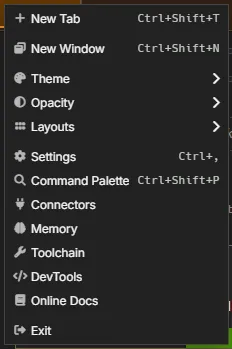
Agents need their CLI tools, and most of those need Node.js and npm. ≡ → Toolchain shows what AgentMux can find: Node.js, npm, Git, Python, and the optional Docker and uv, plus every agent CLI, each with its version, path and status. For a missing Git, Node.js, npm or Python it offers or install it now, which installs through winget on Windows or Homebrew on macOS (if you have them), or through your distribution’s package manager on Linux (for example apt-get, dnf, pacman or zypper, elevated through pkexec). The same option appears in the prompt AgentMux shows when you pick an agent whose required tools are missing.
A Local models section, between the core tools and the agent CLIs, looks for tools for running models on your own machine: Ollama, llama.cpp, LM Studio and llmfit. Each row shows the version and path it found, or “Not installed (optional)”, with an install command to copy and a link. There is no one-click install for these (frontend/app/store/toolchain-catalog.ts, LOCAL_MODEL_TOOLS).
The coding agents OpenCode, goose, Crush and Aider used to be listed there too. They are harnesses now, so they’re listed with the other agent CLIs, with the version AgentMux was tested with, and you can launch them from the agent picker. See Harnesses and providers.
System tray
Section titled “System tray”AgentMux shows an icon in the system tray (the menu bar on macOS) while it runs. Closing the last window quits AgentMux, unless you’ve turned on Keep running after all windows are closed. The icon’s menu has, below any notification items:
- New Window (Start AgentMux if the app isn’t running).
- Start at login, a check item (see below).
- Quit AgentMux, which shuts AgentMux down completely.
On Windows and Linux, left-clicking the icon opens the oldest pane that needs you, or a new window; on macOS it opens the menu. On Windows 11 a new tray icon starts in the overflow (^) area; drag it onto the taskbar to keep it visible.
The switches are in Settings → Notifications & Tray, under System tray (crates/launcher/src/background_config.rs, crates/launcher/src/tray/):
| Setting | Key | Default | Applies |
|---|---|---|---|
| Show icon in the system tray | app:showtray | On | At the next launch |
| Keep running after all windows are closed | app:runinbackground | Off | At the next launch. Turning it on also shows the tray icon, since the icon’s menu is then the only way to quit. |
| Start at login | app:startatlogin | Off | Immediately. The same switch is in the tray icon’s menu. |
Start at login starts AgentMux in the tray when you log in, without opening a window; click the tray icon or choose New Window to open one. An AgentMux started this way keeps running after you close its windows, whatever Keep running after all windows are closed says. If AgentMux is already running when you log in, the login start does nothing (crates/launcher/src/start_at_login.rs).
On Linux the icon needs a StatusNotifier host; GNOME needs the “AppIndicator and KStatusNotifierItem Support” extension, which Ubuntu ships. If the tray can’t start, closing the last window always quits AgentMux, and a login start opens a normal window instead of staying hidden.
Updating
Section titled “Updating”Apart from the Microsoft Store build, AgentMux doesn’t update itself. To update, download the new release and install or run it in place of the old one. Quit the old version first: close its windows, or, if you turned on Keep running after all windows are closed or it was started at login, use Quit AgentMux in its tray icon’s menu (see System tray). Your settings and agents carry over, because every release build uses the same stable channel. See Update model.
Next Steps
Section titled “Next Steps”- Quickstart: your first agent in a few minutes
- First Agent Setup: connect your first AI agent
- Configuration: customize your settings