
Report Issues
Report a Bug or Issue
Section titled “Report a Bug or Issue”Found a bug, unexpected behavior, or incorrect information in the app or docs? First check the open issues in case it’s already reported.
The bug report form asks for:
- Current behavior: what happened
- Expected behavior: what should have happened instead
- Steps to reproduce: how to trigger the same behavior
- AgentMux version
- Platform, OS version and architecture
- Anything else, such as screenshots or logs
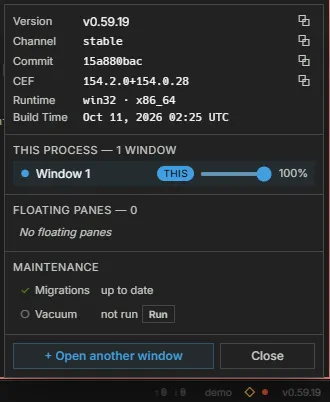
To find the version, click the version number (for example v0.59.0) at the right end of the status bar. The instance panel that opens starts with these rows (frontend/app/statusbar/InstancePanel.tsx):
| Row | Shows |
|---|---|
| Version | The AgentMux version, with a DEV badge on a dev build |
| Channel | The release channel (stable for release builds) |
| Commit | The short git commit the build was made from |
| CEF | The version of the Chromium Embedded Framework (CEF) the build uses |
| Runtime | Platform and architecture |
| Build Time | When the build was made |
Version, Channel, Commit and CEF each have a copy button. Include them in your report.
Logs are in ~/.agentmux/channels/<channel>/versions/<version>/logs/ (on Windows, under %USERPROFILE%\.agentmux\). Release builds use the stable channel. To open the folder, click the host name just left of the version in the status bar: the Data row of the panel shows this version’s data folder (…/versions/<version>/data), and clicking the path opens it in your file manager. The logs folder is next to it. On Linux and macOS the ~/.agentmux folder is readable only by your user account (mode 0700). Logs can include file paths and other details about your machine, so review them before attaching.
If the AgentMux window stops responding on Windows (its UI thread misses two liveness checks in a row, so after one to two minutes), the launcher saves a small diagnostic dump of it to %LOCALAPPDATA%\CrashDumps\agentmux-host-hang\<instance>\, keeping the newest 5 per instance. It holds thread and handle information, not the window’s full memory, and nothing is killed. If you had to end a hung AgentMux, look there and attach the newest .dmp file (crates/launcher/src/host_hang_dump.rs).
Most error messages in AgentMux, such as an agent’s failure row or the startup error card, have a Copy error or Copy details button. It copies the error with its code, where it happened and when, and replaces the tokens, private keys and passwords it recognises with [redacted…] markers (frontend/app/errors/redact.ts). Paste that into your report. Redaction is best-effort, so still read it before posting.
The same page also has a feature request form.
AI-Generated Content
Section titled “AI-Generated Content”AgentMux coordinates AI agents that generate code, text, and other outputs. AI-generated content may be inaccurate, incomplete, or inappropriate. Always review agent outputs before using them in production.
If you encounter issues with AI-generated content within AgentMux:
Report AI content issues on GitHub →
Other Channels
Section titled “Other Channels”- Discord: join our community for real-time help and discussion
- GitHub Discussions: ask questions or share ideas