
Identity & Accounts
An agent binds directly to Accounts, at most one per provider (agent → account, enforced at resolve time). An agent’s Identity is its set of directly-bound accounts — a derived view, not a stored object. This decouples what an agent does (configured by the agent’s bundles and provider) from who it acts as (its bound Accounts).
What an Account is
Section titled “What an Account is”An Account is a single credential pointer — one provider, one kind, one secret reference:
| Provider class | Credential kind | Examples |
|---|---|---|
github | Personal access token | repo scopes, gh CLI auth |
aws | Profile name (referenced from ~/.aws/) | dev, qa, prod |
anthropic | API key or OAuth | Claude API access |
openai, google, slack | API key or OAuth | provider-specific |
custom | Free-form key/value | Any provider-specific token |
AccountProvider is "github" | "openai" | "aws" | "anthropic" | "google" | "slack" | "custom" | "agentmux" today, with custom covering anything that doesn’t fit a named slot. An agent can bind at most one Account per provider — a conflict (e.g. trying to bind a second github account) is a surfaced validation error at resolve time, not a silent pick.
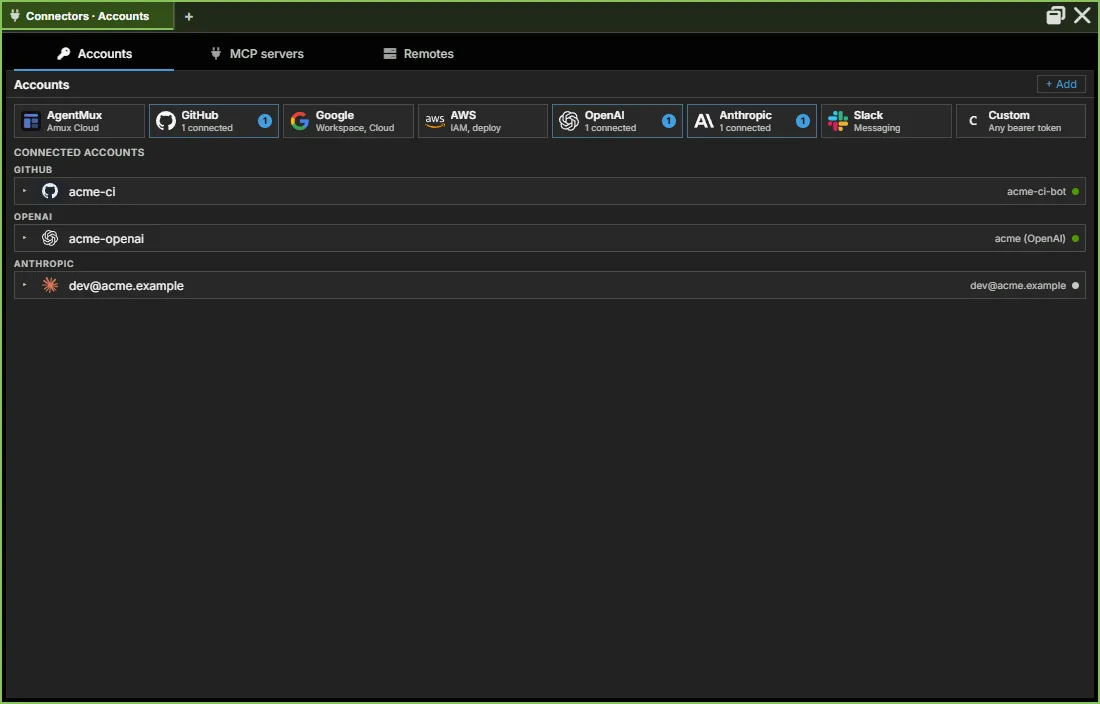
Connectors → Accounts lists them, grouped by service:
OAuth credentials as Accounts
Section titled “OAuth credentials as Accounts”OAuth logins are Accounts, not a separate concept. Each Claude / Codex / Copilot OAuth login lives in its own auth-config directory, referenced by the Account’s SecretRef (oauth_config_dir backend — see Identity & credential storage). Two Accounts for the same provider hold genuinely distinct OAuth sessions (work vs. personal, etc.), each with a status field (valid / expired / invalid / unknown / checking) surfaced in Connectors → Accounts so credential health is visible without launching an agent.
The OAuth invariant: a successful OAuth flow always lands bound to an Account — the CLI’s own OAuthConfigDir belongs to that Account directly, so there’s no intermediate grouping object to provision (log in → Account → bind to an agent).
How Identity is reached
Section titled “How Identity is reached”Identity is not a widget-bar entry. Two paths reach it:
Per-agent (read-only):
- Open an Agent pane (pinned in the widget bar).
- Click the Stash icon (
toolbox) in the pane header — this single icon replaced the older separate Memory-icon/Identity-icon pair. - Switch to the Accounts tab — a Provider/Account/Status table of this agent’s direct account links (
AgentIdentityLinksPanel). It’s read-only, with one exception: for a Claude agent, its Claude row (or the empty table, if it has no Claude link) offers Connect / Re-login, the in-pane way to fix a missing or broken Claude binding.
App-wide manager (Connectors pane):
- Click Connectors in the widget bar (pinned by default), or choose Connectors from the hamburger menu (≡).
- The pane opens on its Accounts section — create, edit, and delete Accounts. There is no standalone “Identities” section: Connectors is scoped to shared, reusable resources, and per-agent bindings live on the agent pane instead.
New account↔agent links are created in several places:
- When the agent is created or first signs in. A new agent takes its provider’s first account; signing in from the agent pane (Log in) saves the login as an account and binds it. See At launch.
- The agent pane’s failure row, when the agent can’t sign in: Bind: <account> or Bind account.
- The account chip in the composer strip, which switches a working agent to another of your accounts for its provider (this restarts the agent).
- The “Bind to Agent” right-click menu on an account row in Connectors → Accounts. It lists the channel’s compatible agents, marked with which one is already bound to this account (checkmark) and which is bound to a different account for the same provider (“bound: work-claude”); clicking an agent creates or rebinds the link. See Connectors → Binding an account to an agent for the full mechanics (candidate filtering, live-apply on a running agent, etc.).
- Stash → Accounts → Connect / Re-login, for Claude only (above).
The view registration (view: "identity") and IdentityPaneViewModel exist for pane.open RPC and right-click menu paths, but the primary paths are the two above.
At launch
Section titled “At launch”The new-agent panel under a harness card in the agent picker has no account field. A new agent takes its provider’s first account from Connectors → Accounts. If the provider needs an account and none is bound, the pane shows Not signed in or No account linked when the agent starts, with Log in and Bind actions (see First Agent Setup → Sign in).
Each time the agent’s process is spawned, AgentMux:
- Reads the agent’s
(agent_id, provider) → account_idlinks fromdb_agent_identity_links. - Resolves each Account’s
SecretRef. - Computes the per-provider env vars (
GH_TOKEN,AWS_PROFILE, …) the agent’s CLI needs. - Spawns the agent process with those env vars set.
To change an agent’s account later, click the account chip in its composer strip and pick another, or use Bind to Agent in Connectors → Accounts.
Earlier versions had a Launch Agent dialog with one account dropdown per provider and an inline Pre-Launch Auth panel. Nothing in the current agent picker opens it.
Persistence
Section titled “Persistence”Accounts and their agent bindings live in two SQLite tables (not the per-channel objects.db — see Persistence and Data layout for the full split between per-channel and shared databases), but as of SPEC_IDENTITY_STORE_SPLIT_2026_08_17.md the two tables no longer live in the same physical store:
| Table | Owns | Where it lives |
|---|---|---|
db_accounts | The credential record: id, name, provider, kind, display_name, secret_ref, context, status | The account store — account-wide store.db under ~/.agentmux/shared/ on the stable channel, but a per-channel-isolated store by default on every other channel. This is the same conditional default covered in Auth flows → Isolated auth by channel; it applies to the connectable-account list in Connectors → Accounts, not to a link once created (next row). |
db_agent_identity_links | Direct binding: (agent_id, provider) → account_id, one row per agent+provider | A separate, permanently-global identity store — never redirected by channel or by the isolated-auth setting, regardless of which channel created the link. |
Why this split matters: a link an agent already has to an Account survives a channel or version switch even though the underlying account list in Connectors → Accounts may reset to empty on a fresh non-stable channel (see Auth flows) — don’t conflate the two. To keep an existing link resolvable even when its target account row isn’t present in the current channel’s (possibly-isolated) account store, the account row is also mirrored into the always-global identity store at the moment a link is created; resolving a binding at agent-spawn time falls back to that mirror copy if the channel-local account store doesn’t have it. This is what makes “my agent still launches with the right account after I switch channels” hold even though “the account list itself” doesn’t.
db_agent_identity_links is a direct junction between an agent definition and db_accounts — there is no intermediate grouping table. See docs/specs/SPEC_IDENTITY_STORE_SPLIT_2026_08_17.md in the main repo for the store split described above.
What Identity is not
Section titled “What Identity is not”- Not a credential vault. AgentMux doesn’t encrypt or audit credential access at the OS level today. An Account is a pointer — the credential still lives wherever the provider’s CLI or secret store puts it.
- Not a grouping object. There is no bundle/collection layer between an agent and its Accounts — bindings are direct, one Account per provider.
- Not a top-level pane. No widget-bar entry. See Pane types for the full pane catalog.
See also
Section titled “See also”- Bundles — the other half of agent composition (instructions + context files)
- First Agent Setup — provider login flows
- Auth flows — per-provider auth-dir isolation, and the conditional isolated-auth-by-channel default
- Connectors — the “Bind to Agent” context menu, the second path to creating an account↔agent link
- Pane Types — where Identity surfaces in the UI