
Build a widget
A widget is a folder with a widget.json and a web page. It runs sandboxed in its own pane and talks to AgentMux through the widget SDK, which AgentMux serves itself, so a widget needs no build step and no dependencies. (For what users see when they install one, see Your own widgets.)
Your first widget
Section titled “Your first widget”Make a folder named for your widget’s id, say acme.counter, with three files.
Directoryacme.counter/
- widget.json the manifest
- index.html the page
- app.js the code
widget.json, the manifest:
{ "manifestVersion": 1, "id": "acme.counter", "name": "Counter", "version": "1.0.0", "description": "Counts clicks, one count per pane.", "icon": "hand-pointer", "kind": "sandboxed", "entry": "index.html", "permissions": [], "contributes": { "panes": [{ "name": "main", "label": "Counter" }] }}The id is <publisher>.<name>: lowercase letters, digits and -, with one dot. The folder must have the same name. icon is a Font Awesome icon name.
index.html, the page:
<!doctype html><html> <head> <meta charset="utf-8" /> <!-- AgentMux's theme as CSS, so the widget matches the app in dark and light. --> <link rel="stylesheet" href="/agentmux/widget-sdk/am-widget.css" /> </head> <body> <p id="count" class="muted">Connecting…</p> <button id="click" class="primary">Click me</button> <script type="module" src="app.js"></script> </body></html>app.js, the code:
import { connect } from "/agentmux/widget-sdk/v1.js";
// The handshake. It also applies the theme and keeps it current.const am = await connect();
// This pane's own state: it survives restarts and moves with the pane.let clicks = Number(am.info.meta.clicks ?? 0);
function render() {  document.getElementById("count").textContent = `Clicked ${clicks} times.`;  am.ui.setTitle(`Counter (${clicks})`);}
document.getElementById("click").addEventListener("click", async () => {  clicks += 1;  render();  await am.meta.set({ clicks });});
render();
Install it and try it
Section titled “Install it and try it”- In AgentMux, open Settings → Widgets → Install… and pick your
widget.json. - Approve it. It asks for no permissions, so the prompt says so.
- Open Counter from the widget bar’s more menu, or from a pane’s + menu.
The approval prompt in step 2, in Settings → Widgets, says who made the widget and what it can do:
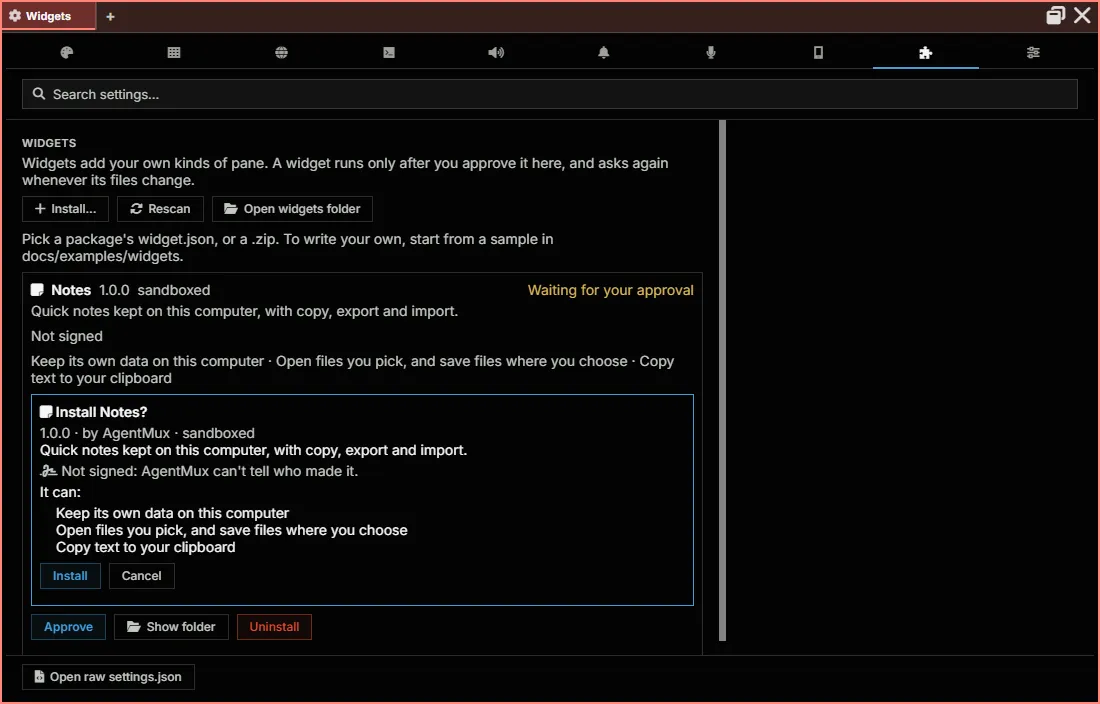
AgentMux copies your folder into ~/.agentmux/widgets/acme.counter/. To change the widget, edit that copy, or edit yours and install it again with Replace. AgentMux notices the change and asks you to approve the new version; open panes reload when you do.
Do more with the SDK
Section titled “Do more with the SDK”Everything outside the widget’s own pane needs a permission in widget.json, which the user sees and approves:
// Keep data on this computer ("storage").await am.storage.set("note:1", { text: "buy milk" });const keys = await am.storage.list("note:");
// Call an API ("net:https://api.github.com"). AgentMux makes the request.const resp = await am.net.fetch("https://api.github.com/repos/agentmuxai/agentmux/pulls");const prs = resp.json();
// Buttons in the pane's header, drawn by AgentMux.await am.ui.setHeaderActions([{ id: "refresh", icon: "rotate-right", title: "Refresh" }]);am.on("action", ({ id }) => id === "refresh" && refresh());
A call the widget wasn’t granted rejects with an AgentMuxError named permission_denied, whose data.permission names what it needs. The Widget API reference lists every method, event and limit.
Use a framework
Section titled “Use a framework”A widget can be built with any framework that outputs static files with relative paths. With Vite, tell it to leave the SDK import alone, since AgentMux serves it:
export default { base: "./", build: { rollupOptions: { external: ["/agentmux/widget-sdk/v1.js"] } },};Put widget.json in public/ so it lands in dist/, then install dist/widget.json. For types and editor completion, copy the SDK’s v1.d.ts next to your code; it describes the whole API. Or install @agentmuxai/widget-sdk from npm, which has the types.
Sign it
Section titled “Sign it”Signing lets the install prompt say who published your widget, and warns your users if a later widget with your publisher name is signed by someone else. The SDK’s agentmux-widget command does it (SDK 1.2.0 and later):
npx -p @agentmuxai/widget-sdk agentmux-widget keygen ~/.agentmux-widget-key.json # oncenpx -p @agentmuxai/widget-sdk agentmux-widget sign ./acme.notes --key ~/.agentmux-widget-key.jsonnpx -p @agentmuxai/widget-sdk agentmux-widget verify ./acme.noteskeygenwrites a new key and prints its fingerprint. Keep the key file private, and keep a copy: a widget signed with a new key gets the “another key” warning for everyone who installed your earlier ones.signwriteswidget.signext towidget.json. It covers every other file, so sign last: AgentMux refuses a widget edited after it was signed.- Publish your fingerprint (in your README, on your site) so users can check it.
Put it in the catalog
Section titled “Put it in the catalog”To list a sandboxed widget in the AgentMux widget catalog, where anyone can install it from Settings, open a pull request there:
- Sign it (above).
- Add its folder as
widgets/<id>/, named as its id, withwidget.sigin it. - The first time, add your publisher name and public key (
publicKeyfrom your key file) topublishers.json.
The catalog’s CI checks the manifest, that the widget is sandboxed and signed by the key publishers.json lists for you, the size limits, and that it loads no script or stylesheet from another site. A maintainer reads it before it’s merged. To update it later, bump its version, sign it again, and open another pull request.
The rules
Section titled “The rules”- A widget loads code only from its own folder. Bundle or copy any library into it; scripts and styles from a CDN are blocked.
- It reaches the network only through
am.net.fetch, to the origins it declared. - It runs in its own frame, with no access to the rest of AgentMux. If it navigates away from its page, AgentMux stops it and offers to restart it.
- A package is at most 50 MB and 2,000 files, with no symbolic links.
Samples
Section titled “Samples”The widget samples are complete widgets to install and copy:
| Sample | Shows |
|---|---|
hello-sandboxed | The smallest widget: the title, the pane’s state, a header action, the theme |
react-vite | The same, built with React and Vite |
notes | storage, plus export and import with files, and copy with clipboard:write |
pr-dashboard | net.fetch to GitHub’s API, polling only while the pane is shown, a palette command and a status bar item |
ask-agent | Your agents and whether they’re working, and a message to one |
Let an agent build it
Section titled “Let an agent build it”Your agents can build widgets too: describe what you want, and the agent writes it, installs it with its WidgetInstall tool (you approve it), and opens it next to its pane with OpenWidget. If it doesn’t look right, tell the agent; each fix asks you to approve the new version.