
Widget security
A widget is code someone else may have written, running in your AgentMux. This page says what keeps it to what you approved, and what doesn’t. For using widgets, see Your own widgets; for the wider picture, the Trust model.
The short version
Section titled “The short version”- No widget runs until you approve it, in AgentMux’s own window, and only the exact version you approved. Any change to its files asks again.
- A sandboxed widget can’t reach AgentMux, your files or the network except through the widget API, and only for the permissions you approved. AgentMux checks every call against them twice: in the app and in the server.
- A trusted widget has full access, by design, and its prompt says so in those words.
Approval
Section titled “Approval”- Installing a widget copies it in and does nothing else. It runs once you approve it.
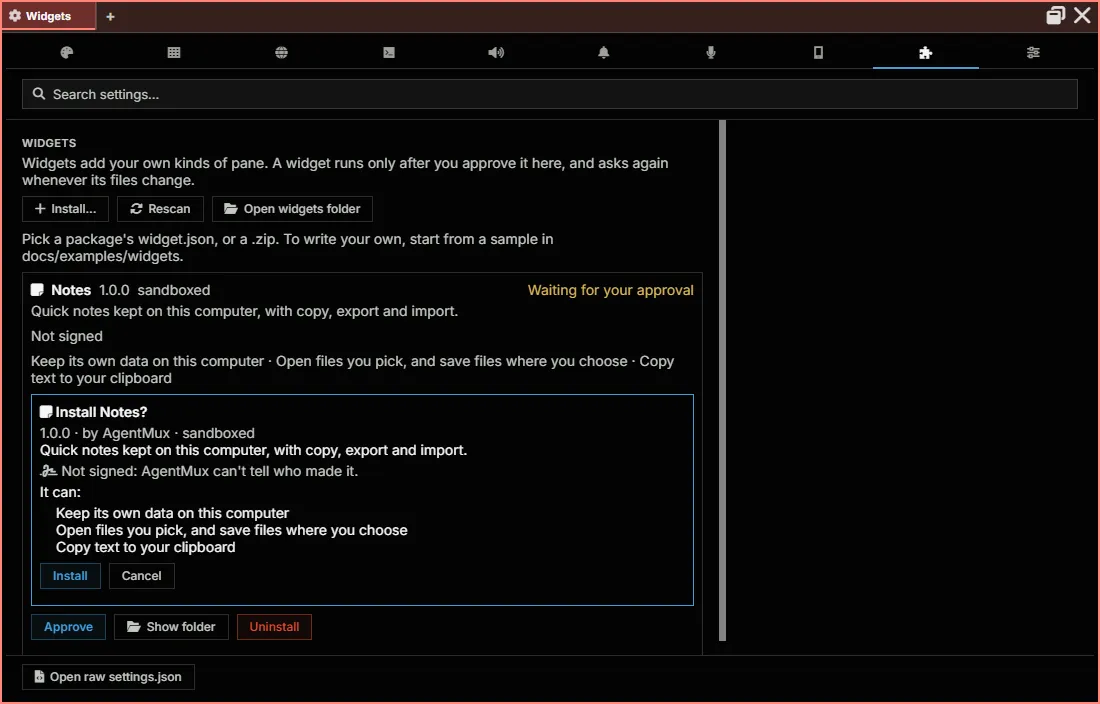
- The prompt lists its permissions in plain words, or, for a trusted widget, the full-access warning.
- Only AgentMux’s own window can approve. The approval reaches the server with a secret that only AgentMux’s window process holds; panes and agents never see it. The server’s auth key, which every terminal pane and agent holds, can install a widget but can’t approve one. So an agent can ask, and you decide.
- An approval names exactly what you saw. AgentMux hashes every file in the widget, and the approval is for that hash. Every file is hashed again each time it’s served. An edited file is never served, whether or not AgentMux has noticed the change yet, and the widget asks for approval again.
- Each AgentMux installation on your computer asks for itself. They share the widgets folder, but not approvals.
The prompt in Settings → Widgets:
Signatures
Section titled “Signatures”- A signed widget carries
widget.sig: an Ed25519 signature over its id, its version and the hash of all its other files. A signature that doesn’t match the files makes the widget invalid; it can’t be installed. - AgentMux remembers each publisher’s key from the first signed widget of theirs you approve, the way SSH remembers a server. A later widget of that publisher signed with another key, or unsigned, is flagged in the prompt, and approving it doesn’t replace the remembered key.
- An approval names the key you saw. The signature isn’t part of the files’ hash, so the prompt’s answer carries the fingerprint it showed, and the server refuses the approval if a different key signs the widget by then.
- Forgetting a publisher’s key goes through AgentMux’s own window, like an approval: the server’s auth key can’t do it.
- A signature names a key, not a person, and says nothing about what the code does. It doesn’t widen a sandboxed widget’s permissions or narrow a trusted widget’s access.
The catalog
Section titled “The catalog”- The catalog’s list is signed with a key whose public half is built into AgentMux. A list from anywhere else, or changed after signing, isn’t read.
- AgentMux downloads a widget only from the catalog’s own site, follows no redirects, and stops a download at the size limit.
- Before copying a widget in, it checks the download’s hash, the widget’s files, that it’s sandboxed, and that the author’s signature is from the key the catalog lists. Then the widget asks for your approval, like any other: the catalog can’t approve one.
The sandbox
Section titled “The sandbox”A sandboxed widget’s page runs in a frame with an opaque origin, isolated from the AgentMux window around it:
- It can’t read AgentMux’s page, storage or cookies, or any of the secrets the app holds.
- It can’t navigate AgentMux or open windows. If it navigates its own frame away from its page, AgentMux stops it.
- It loads code only from its own approved files. A content security policy blocks scripts, styles and frames from anywhere else.
- It can’t make network requests at all from its page. Requests go through
net.fetch, below. - Its files are served at an address that includes the approved version and a key only AgentMux knows, so another web page on your computer can’t load them.
Every call is checked twice
Section titled “Every call is checked twice”The widget talks to AgentMux over one message channel, opened after its page loads. Each request is checked by the pane that hosts the widget, against the permissions you approved.
Calls that reach AgentMux’s server (storage, the network, your agents) go through a session for that pane. On every call the server checks again that the widget is:
- still approved, at the version the session was opened for;
- turned on;
- granted what the call needs.
So a mistake in the app can’t widen what a widget can do. A widget that changed or was turned off loses its sessions at once.
The network
Section titled “The network”net.fetch requests are made by the AgentMux server, not by the widget’s page:
- They carry no cookies and no browser session, and don’t go through a proxy.
- The address must match one of the widget’s
net:permissions, and so must every redirect. - The server looks the address up once and connects to the addresses it checked. A name can’t point somewhere harmless for the check and somewhere else for the request.
- Addresses on your computer or your network (loopback, private and link-local addresses) are refused, unless the permission names that address itself (an IP address, or
localhostfor this computer). A public name that turns out to point into your network is refused, and so is any wildcard. - The widget can’t set the connection’s own headers, and bodies are limited in size and time.
Your agents
Section titled “Your agents”A widget with agents:send can message your agents. Each message is marked as sent by that widget and as unverified, so your agents treat it like any message whose sender they can’t check. Content that looks sensitive is flagged as for any message. A widget can send at most 10 messages a minute.
Even so, an agent acts on what it’s told. Approve agents:send only for a widget you trust; the prompt says so.
Commands and status bar items
Section titled “Commands and status bar items”A widget’s palette commands and status bar items are declared in its widget.json, so you approve them with the widget. A running widget can change how its own items look, never add one or touch AgentMux’s. Its items always show the widget’s name in their tooltip, and only Font Awesome icons. Its commands run only when you click them: they can’t be bound to keys, so an agent can’t run one through AgentMux’s shortcut commands.
What this doesn’t protect against
Section titled “What this doesn’t protect against”- A trusted widget. It runs as part of AgentMux, with everything AgentMux can do. The sandbox doesn’t apply to it.
- Anything with your server’s auth key. Every terminal pane and agent holds that key (see the Trust model), and can already reach the network, your agents and AgentMux’s data directly. A widget’s session gives it nothing more. What it can’t do is approve a widget.
- What you approve. A widget granted
net:https://example.comcan send that site whatever it has: its own storage, files you picked for it. Grant what the widget needs for its job, no more.