
Tower
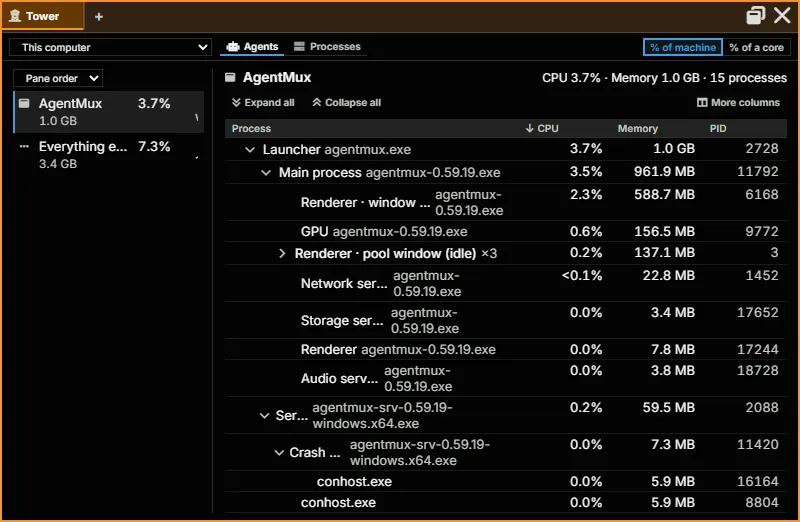
Tower is a read-only task manager pane (frontend/app/view/tower/). It answers two questions: what is each agent running, and what is it costing in CPU and memory; and what is using this machine, and whose is it. It never ends or changes a process, never shows command lines, and needs no administrator rights.
Opening Tower
Section titled “Opening Tower”- Widget bar: more → Tower. It isn’t pinned by default; right-click it to pin it.
- Command palette: Open Tower.
- Any pane’s + menu → Tower, to add it as a tab in that pane.
The toolbar
Section titled “The toolbar”- Machine: This computer, your SSH and WSL remotes, and AgentMux computers you’ve paired. Pair another AgentMux computer… takes a pairing link (
agentmux://pair?…); Forget this computer removes a paired one. - Tower view: Agents (each agent and what it runs) or Processes (every process on the machine).
- Show CPU as: % of machine, the share of the whole machine, as Windows Task Manager shows it; or % of a core, the share of one core, as
topshows it, which can pass 100%.
Agents
Section titled “Agents”A rail on the left lists each agent running here, in the agent’s colour, with its CPU and memory totals and a short CPU sparkline. Below the agents come Terminals (panes with no agent), AgentMux (the app itself) and Everything else (processes no pane started), so the entries add up to the whole machine. Order agents by sets the order: Pane order, CPU, Memory or Name. With no agents, the rail reads “No agents running.”
Select an entry to see its processes on the right as a tree, so you can see what started what, for example claude → bash → cargo → rustc. Processes with the same name under one parent collapse into a single line with their totals (rustc.exe ×6); expand it to see each one. An agent’s support processes, such as its MCP servers, are shown dimmer than the work it started.
This is the view for questions like “which agent is driving this rustc.exe, and how much is that agent using overall?”
Processes
Section titled “Processes”Every process on the machine that AgentMux can read, in one list:
- Group by: Agent, under the agent or terminal that started each process; App, processes of the same app together, as Task Manager does; or None, one flat list. Grouped by agent, processes that no pane started are under Other processes, grouped by app.
- Filter by name, PID or task. Matches stay under their group, so you can still see whose each one is.
- Click a column header to sort by it.
- On a busy machine the list shows the busiest and largest processes, and says so. Processes owned by other users are counted but can’t be measured without administrator rights, which Tower never asks for.
Other machines
Section titled “Other machines”Pick another machine in Machine:
- An SSH or WSL remote runs no AgentMux agents, so Tower shows its processes. SSH hosts must run Linux or macOS; others are listed greyed out as not supported.
- A paired AgentMux computer has agents of its own: Tower shows that computer’s agents and processes.
What Tower doesn’t do
Section titled “What Tower doesn’t do”- It’s read-only: it can’t end, suspend or reprioritise a process.
- It never shows a process’s command line.
- It never asks for administrator rights, so other users’ processes can’t be measured.
- It keeps no history beyond the short sparklines; values are live.
See also
Section titled “See also”- System Metrics: Sysinfo’s machine-wide graphs and the per-pane CPU and memory badges
- Swarm: what each agent is doing, rather than what it costs
- Pane Types: every pane type