
Bundles
A Bundle packages what an agent starts with: its instructions (system prompt, “Soul”), context files, MCP servers, skills and memory. You manage bundles in Memory → Bundles. An agent takes several, in order, picked when you create it and changed later from its Stash. A bundle can be exported as, and imported from, an Agent Bundle Format (ABF) file.
What goes in a bundle
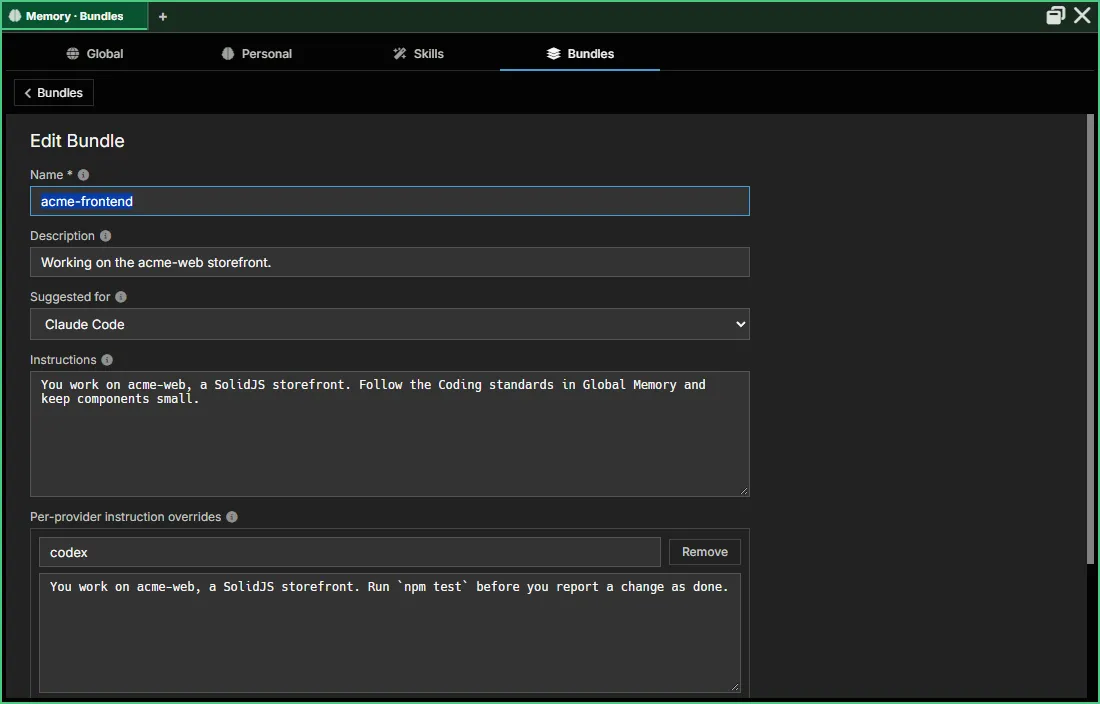
Section titled “What goes in a bundle”The New/Edit Bundle form has Name, Description, an optional Suggested for (provider and vendor), Instructions and per-provider instruction overrides. After a bundle is saved, its detail view adds MCP Servers and Skills sections. See First Agent Setup → Bundles for the form, field by field.
| Field | Purpose | Editable in the UI today? |
|---|---|---|
instructions | System prompt / Soul. Long-form text describing the agent’s personality, priorities, and behavior, delivered through the provider’s startup instructions file. | Yes |
instructions_by_provider | Per-provider overrides that replace instructions when the bundle runs on that provider. | Yes |
provider / model | Suggested for: the provider and vendor the bundle was made with in mind. A hint only; the agent’s own provider decides which harness runs. Optional. | Yes |
context_files | Array of {path, content} entries — files (typically project-scoped, like AGENTS.md or CLAUDE.md) loaded into context on launch. | Not yet — persisted as JSON |
mcp_servers | MCP servers for the bundle: servers from the MCP servers catalog, or servers private to the bundle. | Yes, after saving |
skills | Skill primitive IDs — see Memory → Skills. | Yes, after saving |
An agent with no bundles picked runs the harness as it comes (“vanilla CLI”), plus Global Memory and its own bundle. The singleton is_blank bundle that once stood for this is never offered in a picker.
An agent’s bundles
Section titled “An agent’s bundles”An agent starts with an ordered list of bundles:
- Its own bundle comes first, always. AgentMux creates it with the agent (named “<agent> — ABF”) to hold what’s bound to just that agent, and it can’t be removed from the list. See every agent gets its own ABF.
- The bundles you pick follow, in the order you put them.
You pick them in three places, all with the same control: each picked bundle has Move up, Move down and Remove, and Add a bundle… lists the rest.
| Where | When it’s saved |
|---|---|
| The new-agent form’s Bundles field | When you click Create. It starts empty. |
| The launch modal’s Bundles row | When you click Launch, if you changed it. A bundle isn’t required to launch. |
| Stash → Bundles in the agent pane | On each change. |
At launch, in list order:
- Instructions: each picked bundle with instructions becomes a section of the agent’s startup file (
CLAUDE.md,AGENTS.md,GEMINI.md, …), headed# [Bundle] <name>, after the Global Memory sections (crates/srv/src/backend/storage/agent_bundles.rs). The instructions are no longer sent as the agent’s first message. A bundle deleted since it was picked is skipped. - Skills from every bundle in the list are added to the agent’s own. When two bundles name the same skill, the first one wins.
- MCP servers from the bundles are added when the agent is opened through MuxAPI (
agent.open). The Launch button in the agent pane doesn’t add a bundle’s MCP servers yet. - The provider stays the agent’s own. A picked bundle doesn’t change which harness runs.
The Stash’s Startup tab, which picked one bundle to send as the agent’s first message, became the Bundles tab. A bundle picked there is moved into the list the first time the list is read.
The list is kept per channel, like the agent’s own bundle. Deleting a bundle takes it out of this channel’s lists.
Session zones and default-continue
Section titled “Session zones and default-continue”A bundle keeps a sequence of session zones — one per agent-anchored conversation thread. When you re-launch the same bundle, the agent defaults to continuing the most recent session rather than starting fresh: previous turns load into the new pane, the agent’s context carries over, and you pick up mid-thread.
If you want a brand-new conversation instead, the Launch modal’s Recent sessions tab lets you pick a specific older session to re-attach to (or click + to start a fresh zone). The default is “continue most recent” because that matches the workflow people actually have — close a pane, reopen, keep going.
Session zones are anchored to the agent’s identity (agent_id), not the pane that hosts the conversation. Moving an agent to a new pane preserves its zones; deleting the pane preserves them too.
Where bundles are managed
Section titled “Where bundles are managed”Bundles are managed app-wide only:
- Click Memory in the widget bar, or choose Memory from the hamburger menu (≡).
- Switch to the Bundles section.
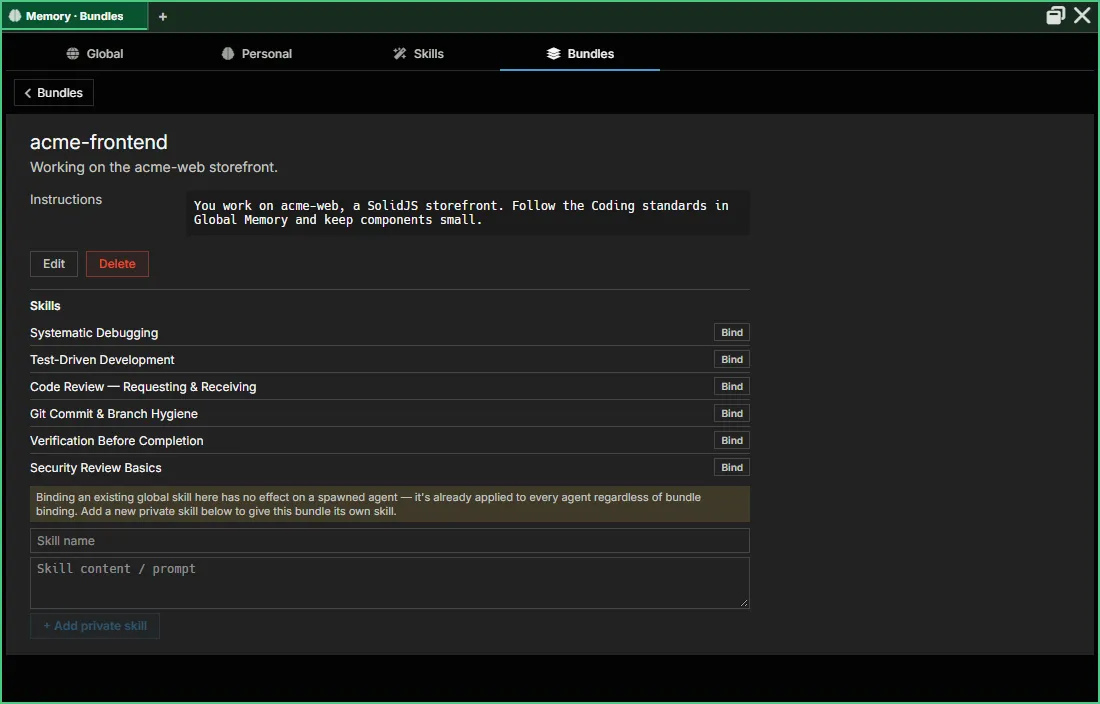
In an agent pane, Stash → Bundles picks which bundles that agent starts with; it links to Memory → Bundles but doesn’t edit bundles itself.
Native memory
Section titled “Native memory”Personal Memory, the notes an agent keeps about itself (stored as “native memory”), is not a bundle. It’s covered on the Memory page, with the memory record that makes it follow an agent across accounts and channels.
Launch flow
Section titled “Launch flow”The Create new agent form, opened from a template card in the agent picker:
┌────────────────────────────────────────────────┐│ Create new agent from Claude Code ││ Name: [my-agent_________] ││ Runtime: (•) host ( ) container ││ Model: [▼ opus ] ││ Bundles: Reviewer ↑ ↓ ✕ ││ [▼ Add another bundle… ] ││ ││ [Cancel] [Create] │└────────────────────────────────────────────────┘It has no account field: the agent takes the provider’s first account, which you can change later from Stash → Accounts. The launch modal for an existing agent has an Identity (account) row, which is required, and the same Bundles row, with the agent’s own bundle shown first.
Persistence
Section titled “Persistence”Bundles live in the db_bundles table:
id TEXT PRIMARY KEYname TEXT NOT NULL UNIQUEdescription TEXTis_blank INTEGER -- the "vanilla CLI session" bundleis_global INTEGER -- a Global Memory entryprovider TEXTmodel TEXTinstructions TEXTinstructions_by_provider TEXT -- JSONcontext_files TEXT -- JSONmcp_servers TEXT -- JSONskills TEXT -- JSONsort_order INTEGERcreated_at INTEGERupdated_at INTEGERis_system INTEGERThe table is defined in crates/srv/src/backend/storage/migrations.rs, both in objects.db’s flat schema (run_object_schema) and in the shared store’s schema (run_shared_store_schema). Global Memory entries are rows in the same table with is_global set.
An agent’s picked bundles are rows of the per-channel db_agent_bundles table (agent_id, bundle_id, position). Its own bundle is db_agents.default_memory_id. Memory replaced the earlier “Forge” concept; the agent-definition catalog (“Forge agents”) now lives separately in db_agent_definitions.
Bundles and per-instance overrides
Section titled “Bundles and per-instance overrides”A bundle is the definition — reusable across many agent instances, edited in Memory → Bundles.
When you launch an agent, AgentMux composes the bundle’s settings with whatever overrides the running pane has accumulated, then spawns the provider’s CLI with the resulting launchArgs and env. Two agents using the same bundle but different overrides land on different actual configs at launch.
See also
Section titled “See also”- Memory — where Bundles, Global Memory, Personal Memory and Skills are managed
- Connectors — accounts and MCP servers
- Agent Bundle Format (ABF) — the bundle file format
- Identity & Accounts — the other half of agent composition
- First Agent Setup — provider login flows
- Pane Types — where Bundles and Personal Memory surface in the UI